Digital menu boards
A Shift-Ready Workflow for Digital Menu Boards Using Toast Menu Data
A useful menu board needs more than a television and a list of items. This workflow helps operators turn Toast menu data into readable, maintainable displays for daily service.
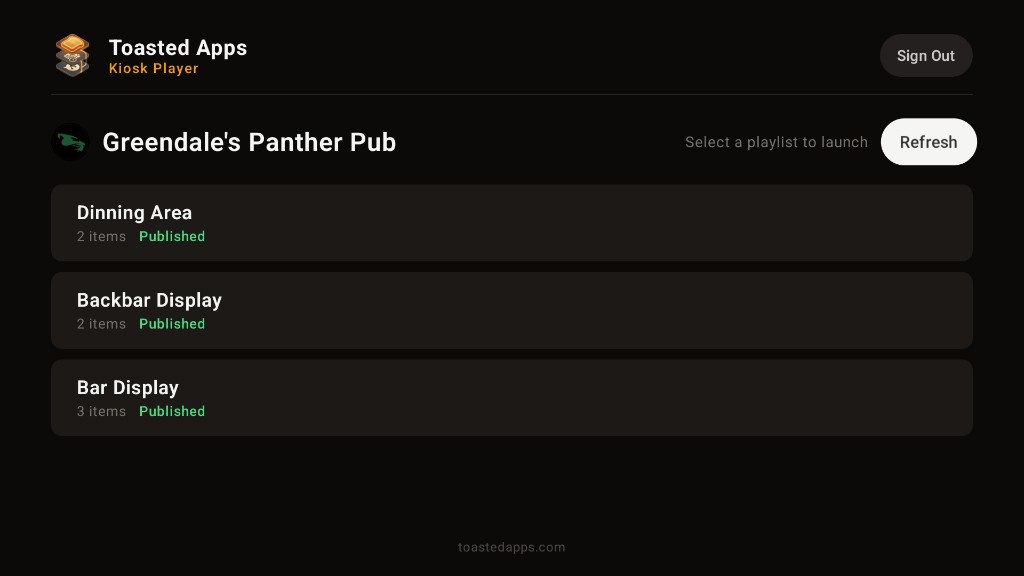
A restaurant digital menu board is only useful when guests can read it quickly and the staff can keep it accurate. If every price change requires edits in several places, the board becomes another system that managers have to remember during an already busy week.
Toasted Apps was created from operating problems Jameson Parker encountered while running Greendale's Panther Pub & Eatery in Greendale, Wisconsin. Its digital menu board feature reads menu data from Toast using API credentials supplied by the restaurant. It does not replace Toast POS.
Here is a practical workflow for turning that menu data into boards your team can manage during real service.
Decide what the board needs to accomplish
Start with the service problem, not the screen.
A counter-service board may need to help guests choose before reaching the register. A bar display might need to highlight a smaller, focused selection. A mobile layout may help guests review the menu from their own devices.
Write down the board's job in one sentence:
- Help lunch guests choose quickly from the core menu.
- Show a focused food selection near the bar.
- Present the current menu in a mobile-friendly web layout.
- Separate food and beverage choices so neither screen feels crowded.
This decision controls how much information belongs on each layout. A board designed to show everything often makes the most important items harder to find.
Clean up the source menu before designing the display
A digital board can present menu data, but it cannot make unclear source information understandable by itself. Review the menu in Toast before deciding how it should appear on a television.
Check for:
- Item names that make sense without a server's explanation
- Duplicate or outdated items
- Inconsistent capitalization
- Prices that need verification
- Categories that reflect how guests order
- Descriptions that are too long for distant viewing
- Internal wording that should not appear in guest-facing copy
For example, an internal item name such as CHX SAND SP may be familiar to the kitchen or register team but confusing on a guest-facing display. Decide whether the source name needs attention before building the board around it.
Treat this audit as an operating task. Assign one person to identify questionable entries and another appropriate team member to approve changes. That reduces the chance of an unreviewed correction affecting service.
Connect the menu data with controlled access
Toasted Apps reads menu data from Toast using restaurant-supplied API credentials. Handle those credentials as sensitive operational information.
Before setup, establish:
- Who is authorized to supply the credentials
- Where credential details may be stored
- Who can work on the board layouts
- Who approves guest-facing changes
- Who should be contacted if access needs to be reviewed
The connection supports the menu board workflow; it does not replace Toast POS. Toast remains part of the restaurant's operating setup, while Toasted Apps uses the supplied access to read menu data for presentation.
Build layouts for viewing distance
A menu that looks tidy on a laptop may be difficult to read from the ordering line. Evaluate television layouts from the guest's actual position, not only from directly in front of the screen.
Use a simple visual hierarchy:
- Category name: Large enough to orient the guest immediately.
- Item name: Clear and easy to scan.
- Price: Consistent in position and format.
- Description: Short enough to support a decision without taking over the board.
Avoid solving a crowded layout by making every line smaller. Better options include:
- Splitting a large menu across multiple layouts
- Removing unnecessary description text
- Giving the most ordered categories more room
- Separating food and beverage sections
- Creating a focused board instead of presenting every available item
Toasted Apps supports digital menu playlists that can be presented on televisions and in mobile web layouts. Think of each playlist as a deliberate sequence rather than a place to collect every possible slide.
Plan playlists around real ordering behavior
A playlist should give guests enough time to understand each view. Rapid changes may look active but can interrupt someone who is halfway through reading a category.
For each playlist, document:
| Decision | Operator question |
|---|---|
| Audience | Who is looking at this display? |
| Location | How far away are they? |
| Content | Which categories are necessary here? |
| Sequence | Does the order match how guests decide? |
| Ownership | Who checks this playlist before service? |
A practical counter sequence might group the main food categories first, followed by beverages or add-on choices. A separate display could use a different focus. The right structure depends on the room, the ordering path, and what guests need at that point.
Do not assume every television needs identical content. A screen near the entrance and a screen above the register can serve different moments in the same ordering process.
Account for televisions without pricing the workflow screen by screen
A Toasted Apps team subscription is not priced per television screen. That can make it easier to plan displays around the room's needs instead of forcing every board into one screen.
Screen count still creates operational work, however. More televisions mean more locations to inspect and more chances for a display to be positioned poorly or overlooked during opening checks.
For each television, record:
- Physical location
- Intended playlist
- Typical viewing distance
- Staff member responsible for checking it
- What the team should do if the display is unavailable
This simple inventory becomes useful when layouts change or a manager needs to troubleshoot the guest experience during service.
Test with real menu edge cases
Do not approve a board after checking only the cleanest category. Test the awkward items that are most likely to break a layout.
Include:
- The longest item name
- The longest description
- A category with many items
- Similar item names that guests may confuse
- Different price lengths and formats
- Items whose names depend on internal abbreviations
- A layout viewed from the farthest guest position
Then run a short service simulation. Ask someone unfamiliar with the design to find a specific item and price. If they need to wait through several views, step closer, or ask what a label means, adjust the layout.
Also review the mobile web presentation separately. A television and a phone have different viewing conditions, so a layout that works across the room should not be assumed to work the same way in a guest's hand.
Create an update and approval routine
The board needs a named owner even when its content comes from POS menu data. Without ownership, teams may notice a problem but assume someone else has already handled it.
Use a small approval chain:
- An authorized team member makes or requests the source-menu change.
- A designated person verifies the guest-facing wording and price.
- The team checks the affected television and mobile layouts.
- Any issue is documented and assigned instead of left for the next shift.
Build checks into existing routines rather than creating an elaborate new meeting.
Before opening
- Confirm each intended television is presenting the correct playlist.
- Read the board from the normal guest position.
- Spot-check several item names and prices against the active menu.
- Review any changes made since the previous service.
- Check the mobile web layout if guests use it.
After a menu change
- Identify which categories and layouts are affected.
- Verify the changed item in its full context.
- Check for wrapping, crowding, or unclear wording.
- Tell front-of-house staff what changed.
- Confirm that old printed or handwritten references are not causing confusion.
Weekly
- Review temporary wording and outdated items.
- Look for categories that have become crowded.
- Confirm each screen still serves a clear purpose.
- Revisit guest questions that may indicate confusing menu language.
Prepare a fallback for service
Digital displays can become unavailable, and the ordering line still needs to move. Decide on a fallback before the restaurant is busy.
A fallback plan should answer:
- Where can staff find an approved menu reference?
- Who decides whether service can continue without a particular display?
- How will cashiers communicate unavailable or changed items?
- Can guests use the mobile web layout where appropriate?
- Who is responsible for restoring and rechecking the board?
Keep the plan short enough for a shift lead to use without searching through a large operations manual.
Know what the menu board does not solve
A menu-data connection reduces the need to rebuild menu information from scratch, but it does not remove the need for human review.
It will not by itself:
- Fix unclear item names in the source menu
- Decide which categories deserve the most space
- Confirm that a television is readable from the ordering line
- Establish who may approve price or wording changes
- Replace an opening check
- Replace Toast POS
The main tradeoff is straightforward: using POS menu data can support a more maintainable presentation, but the restaurant still owns accuracy, layout decisions, access control, and service procedures.
A rollout checklist for the first board
Start with one useful display rather than redesigning every menu surface at once.
- Define the display's audience and job.
- Audit the relevant menu data in Toast.
- Assign credential, layout, and approval responsibilities.
- Build a focused playlist for the selected location.
- Test long names, descriptions, categories, and prices.
- Review the board from the guest's actual viewing position.
- Check the mobile web layout separately.
- Document the opening check and fallback plan.
- Gather staff observations after live service.
- Correct problems before expanding to more displays.
Build for the shift, not just the launch
The best digital menu board is not necessarily the one with the most content or the most televisions. It is the one guests can understand and the team can verify without adding a fragile process to every shift.
Operators who want to evaluate this workflow can review the Toasted Apps digital menu board feature or start a trial.
Toasted Apps is independent and is not affiliated with or endorsed by Toast, Inc.
Sources and further reading
This article was prepared with AI assistance and reviewed against Toasted Apps product facts and first-hand restaurant operating experience.